
下面盗用一张艾伦 Aaron大佬总结的图 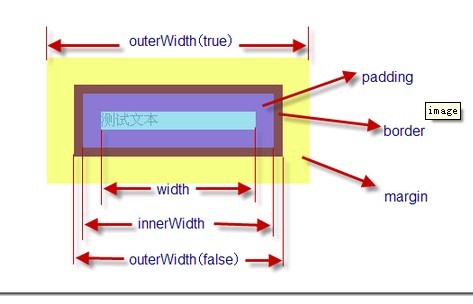
1、获取元素宽高的兼容处理
js
//添加innerHeight, innerWidth, height, width, outerHeight and outerWidth methods
jQuery.each({ Height: "height", Width: "width" }, function (name, type) {
    //name表示Height和Width type是height和width
    jQuery.each({ padding: "inner" + name, content: type, "": "outer" + name },
        // funName表示 innerHeight和outerHeight innerWidth、outerWidth以及height和width
        function (defaultExtra, funcName) {
            //inner
            // Margin is only for outerHeight, outerWidth
            jQuery.fn[funcName] = function (margin, value) {
                // extra为 margin或者border
                const  extra = defaultExtra || (margin === true || value === true ? "margin" : "border");
                //判断是否是window
                if (isWindow(elem)) {
                    // $( window ).outerWidth/Height return w/h including scrollbars (gh-1729)
                    return funcName.indexOf("outer") === 0 ?
                        elem["inner" + name] :
                        elem.document.documentElement["client" + name];
                }
                //判断是否是document
                if (elem.nodeType === 9) {
                    const doc = elem.documentElement;
                    //获取文档的宽高 兼容处理
                    // Either scroll[Width/Height] or offset[Width/Height] or client[Width/Height]
                    return Math.max(
                        elem.body["scroll" + name], doc["scroll" + name],
                        elem.body["offset" + name], doc["offset" + name],
                        doc["client" + name]
                    );
                }
                //没有值时就设置值,有的时候就获取值
                return value === undefined ?
                    // 获取元素宽高
                    jQuery.css(elem, type, extra) :
                    // 给元素设置宽高
                    jQuery.style(elem, type, value, extra);
            };
        });
});